
What is notes? I had no idea until I tested it out. We need a better word, and we need an info icon. Notes is associated with internal stuff. Let's use the word "Label".
-
Show package information on selected scheduling links page
Add scheduling links in package confirmation details
Should we invert these settings and use checkbox? This will make it
Hide package information on selected scheduling link pages
Hide scheduling links in package confirmation details
Pros:
Anxiety of what's enabled is not there
Majority of cases it will be default
Cons:
Customers may not read the setting altogether, making them un-aware that this information is being displayed by default
-
Showing duration and price for these meetings so client can make decisions easily
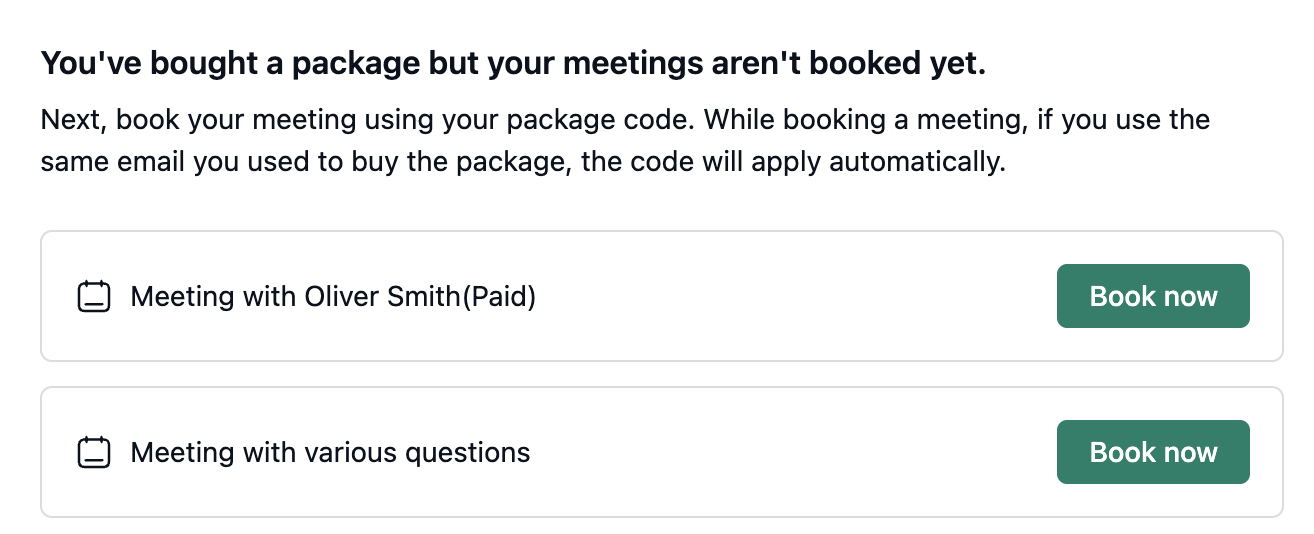
Pre-fill scheduling link form if directed from a package purchased page.
Duration -> Redeemable value in package table
Change package duration/bookings to -> Redeemable value, in purchase confirmed page (client).
Total bookings -> Redeemable value in package details page.
Total bookings -> Redeemable value in client /purchase page
Let's make price left aligned in packages table
Logo section is taking too much attention.
Should we keep the profile picture as default for logo, or no logo? I think, we keep it empty, with two options. To use profile picture or upload.
-
Should we replace package type -> redeemable for, and change the following
Duration based -> Total number of minutes
Bookings based -> Total number of bookings
Should we work on setting redeemable price as well?
PRD: Booking-Based Package Type
Overview
NeetoCal packages currently support only duration-based limits (e.g., “120 minutes of coaching”). This enhancement introduces a second package type: booking-based packages (e.g., “4 coaching sessions”).
Both types coexist. A host selects the type when creating or editing a package.
Motivation
Duration-based packages work well for variable-length appointments, but many use cases are session-oriented — a client purchases N sessions and redeems them one at a time.
Supporting booking-based packages:
Removes mental calculation of minutes
Makes the purchase clearer to customers
Matches real-world session-based businesses
Feature Details
1. Package Creation & Editing (Admin)
A new required Package type dropdown is added:
Duration based (default)
Booking based
Conditional Fields
Package Type |
Fields Shown |
|---|---|
Duration based |
Redeemable duration — number input + time dropdown |
Booking based |
Redeemable bookings — number input |
Both variants include a Label field (previously Notes).
Help text:
This text will be displayed next to the redeemable value on package page. Use it to provide additional context, such as “one session per week”.
Validation Rules
Duration-based
Required
Positive integer
Existing duration validations apply
Booking-based
Required
Positive integer (minimum 1)
Duration-specific validations skipped
2. Booking Deduction
Duration-based
Deduct meeting duration (minutes)
Booking-based
Deduct 1 booking regardless of meeting duration
3. Recurring Bookings
For recurring bookings with N occurrences:
Deduct N bookings
4. Cancellation
Package Type |
Behavior |
|---|---|
Duration-based |
Duration restored |
Booking-based |
1 booking restored |
5. Booking Rejection (Approval Flow)
Package Type |
Behavior |
|---|---|
Duration-based |
Duration restored |
Booking-based |
1 booking restored |
6. Awaiting Approval
Deduction occurs at booking creation time, not approval time.
If rejected → value refunded.
7. Purchase Code Validation
Package Type |
Validation |
|---|---|
Duration-based |
Remaining duration ≥ meeting duration |
Booking-based |
Remaining bookings ≥ 1 |
8. Admin Purchase Management
Package Type |
Actions |
Input Label |
|---|---|---|
Duration-based |
Add minutes / Deduct minutes |
Number of minutes |
Booking-based |
Add bookings / Deduct bookings |
Number of bookings |
Validation:
Cannot deduct more than remaining value
9. Package Purchase (Customer Side)
Booking-based purchase:
bookings_remaining = total_bookings
Code expiry:
Identical behavior for both types
UI Changes
Package Form (Create/Edit) — Admin
Element |
Before |
After |
|---|---|---|
Package type dropdown |
Did not exist |
Duration based / Booking based |
Duration input label |
Package duration |
Redeemable duration |
Bookings input |
Did not exist |
Redeemable bookings |
Notes field label |
Notes |
Label |
Notes placeholder |
Enter notes |
e.g. one session per week |
Notes help text |
None |
Help icon with popover |
Image upload section |
Inline description |
Help tooltip |
Package List Table — Admin
Element |
Before |
After |
|---|---|---|
Column header |
Package limit |
Redeemable value |
Column value |
Duration only |
Duration OR X bookings |
Package Show Page (Details Card) — Admin
Element |
Before |
After |
|---|---|---|
Section header |
Duration |
Redeemable value |
Value |
Duration only |
Duration OR X booking(s) |
Purchase History Table — Admin
Element |
Before |
After |
|---|---|---|
Remaining column |
Duration only |
Duration OR bookings remaining |
Admin Purchase Detail Page
Element |
Before |
After |
|---|---|---|
Total label |
Total duration |
Redeemable value |
Total value |
Duration only |
Duration OR X bookings |
Remaining label |
Remaining duration |
Remaining duration / Remaining bookings |
Update pane title |
Update remaining duration |
Update remaining duration / bookings |
Update pane actions |
Add minutes / Deduct |
Add bookings / Deduct bookings |
Update pane input |
Number of minutes |
Number of bookings |
Public Package Page (Live Booking Page)
Element |
Before |
After |
|---|---|---|
Icon |
Clock |
Duration: Clock / Booking: Calendar |
Value text |
Duration only |
Duration OR X bookings |
Intro Page (Package Cards)
Element |
Before |
After |
|---|---|---|
Package value |
X minutes |
Duration OR X bookings |
Purchase Confirmation Page (Customer)
Element |
Before |
After |
|---|---|---|
Package value label |
Package duration |
Redeemable value |
Package value |
Duration only |
Duration OR X bookings |
Meeting cards |
Name + Book now |
Name + duration + price + Book now |
Book now button |
Opens link |
Prefills name + email |
Discount / Purchase Code Section
Element |
Before |
After |
|---|---|---|
Remaining balance message |
Duration only |
Duration OR X booking(s) remaining |
Activity Tracking
New Activity Types
Activity |
When Logged |
Details |
|---|---|---|
Bookings added |
Admin adds bookings |
Bookings added, Remaining bookings, Notes |
Bookings deducted |
Admin deducts bookings |
Bookings deducted, Remaining bookings, Notes |
Modified Activity
Activity |
Before |
After |
|---|---|---|
Booking confirmed |
Remaining duration |
Duration OR Remaining bookings |
Email Changes
Purchase emails display:
Duration-based → formatted duration (unchanged)
Booking-based → booking count (e.g., 5 bookings)
Text & Label Changes (Complete List)
Location |
Old Text |
New Text |
|---|---|---|
Package type label |
— |
Package type |
Type option 1 |
— |
Duration based |
Type option 2 |
— |
Booking based |
Duration label |
Package duration |
Redeemable duration |
Bookings label |
— |
Redeemable bookings |
Notes label |
Notes |
Label |
Notes placeholder |
Enter notes |
e.g. one session per week |
Notes help |
— |
Help text |
Image upload description |
Inline |
Tooltip |
Package list header |
Package limit |
Redeemable value |
Package show header |
Duration |
Redeemable value |
Purchase total label |
Total duration |
Redeemable value |
Remaining bookings |
— |
Remaining bookings |
Add bookings |
— |
Add bookings |
Deduct bookings |
— |
Deduct bookings |
Input label |
— |
Number of bookings |
Confirmation value label |
Package duration |
Redeemable value |
Confirmation title |
Corrupted |
You've bought a package but your meetings aren't booked yet. |
Singular booking |
— |
1 booking |
Plural booking |
— |
X bookings |
Validation error |
Package is required |
Package name is required |
Edge Cases & Scenarios
Scenario |
Expected Behavior |
|---|---|
30-min meeting with booking package |
Deduct 1 booking |
Recurring booking (4 occurrences) |
Deduct 4 bookings |
Cancellation |
Restore 1 booking |
Host rejection |
Restore 1 booking |
bookings_remaining = 0 |
Code rejected |
bookings_remaining ≥ 1 |
Code accepted |
Stripe booking package |
Duration validations skipped |
Different meeting durations |
Validation skipped |
Mixed package list |
Correct formatting per row |
Existing packages |
Unaffected |
Code expiry |
Same behavior |
Book now click |
Prefilled scheduling link |
Meeting without price |
Price hidden |
Meeting without duration |
Duration hidden |
Design Decisions
Redeemable value used as a unified label across UI.
Label field renamed from Notes to clarify purpose.
Image upload help collapsed into tooltip to reduce noise.
Calendar icon used for booking-based packages.
Prefill via URL params for Book Now.
Deduction at booking creation for approval workflows.
Per-occurrence deduction for recurring bookings.